PocketQuery lets you use wildcards as parameter values instead of fixed ones. These wildcards will be replaced by a given value from the Query context before the Query is executed. The wildcards can be set by the user when adding the PocketQuery macro to a page, or directly within the query statement or REST URL itself. This way the macro user herself has no opportunity to adjust the values manually, which can be preferred for security reasons.
The following wildcards can be set as parameters values:
|
|
the human readable space key of the current Confluence content (e.g. |
|
|
the space ID of the current Confluence content (e.g. |
|
|
the name of the current space |
|
|
the type of the current Confluence content ( |
|
|
the version of the current Confluence content (e.g. |
|
|
the ID of the current Confluence content (e.g. |
|
|
the title of the current Confluence content (e.g. |
|
|
the ID of the macro executing your Query (e.g. |
|
|
the name of the current Confluence user (e.g. |
|
|
the email address of the current Confluence user |
@user.displayName and @user.email are always filled in by PocketQuery from the account of the user viewing the page. @content.type, @content.version and @content.title are taken from the Confluence content the macro is on, including unpublished drafts. If Confluence cannot be reached to verify this information, the Query is not run and this message is shown: Confluence could not be reached to verify your account, so the query was not run. Please try again in a moment.
Wildcards can be used in two different ways:
-
They can be part of the Query statement directly. In this case, the wildcard needs to be prefixed by a
:like a normal parameter:
SELECT *
FROM customers
WHERE companyName = :@space.key
The same is true for REST Queries:
/rest/search?query=:@content.id
-
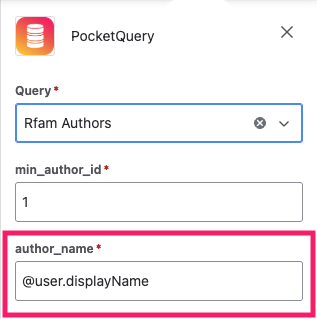
Wildcards can be used as values for Query parameters. To do this, simply enter your desired wildcard via the PocketQuery macro editor: