
Diary ships with the two styles you know from Data Center. Pick one with the Diary style parameter — see Macro Parameters.
📷 Both screenshots on this page should show the same three entries, written by two or three different people, so a reader can compare the styles rather than the content. Take them one after the other by flipping the Diary style parameter.
Simple
The default. Each entry is a compact block, ruled off from the next by a horizontal line. The header carries the date, the time (if Display Time In Entries is on), and the author's name.

Best when the diary is long and you want to scan it quickly.
📷 Screenshot: style-simple.png — three entries in Simple style, with the rules between them and the date, time, and author name legible in each header.
Bubble
Each entry sits in its own rounded, raised box beside the author's avatar, with the author's name leading the header rather than trailing it.
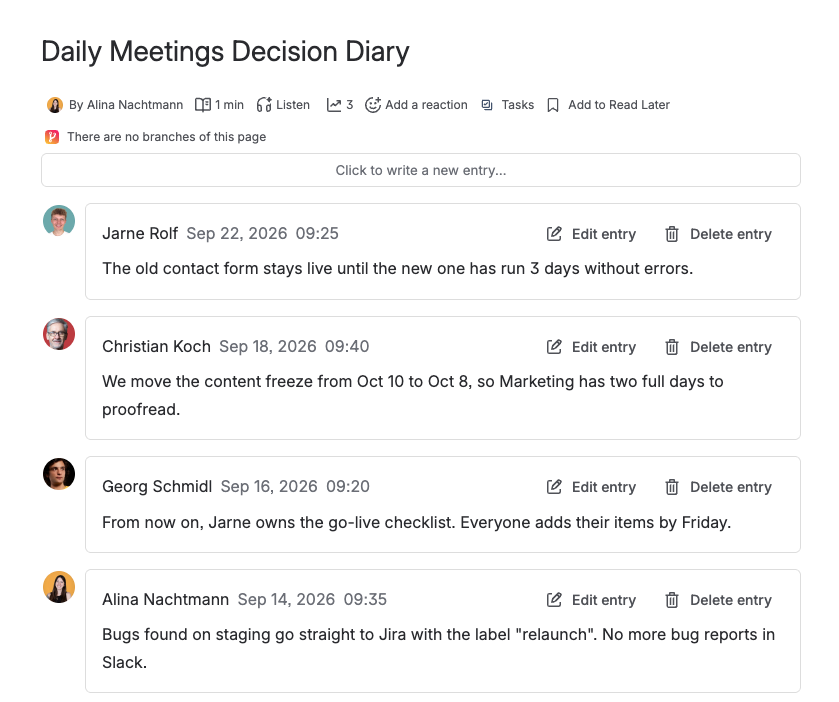
Best for a diary several people write in, where seeing who wrote what at a glance matters.
📷 Screenshot: style-bubble.png — the same three entries in Bubble style, with the avatars and boxes clearly visible. Use entries from two or three different authors so the avatar column earns its place.
Both styles are rebuilt with Forge UI Kit components, so they do not match the Data Center stylesheet pixel for pixel. The most visible difference is that the bubble style draws no speech-bubble tail — UI Kit has no pseudo-elements to draw one with.
Switching between them
Style is a macro parameter, not a per-entry setting: every entry in one Diary uses the same style. Changing it does not touch the entries themselves, so you can switch back and forth as often as you like without any risk to your content.