
The scheduled reminders cover all your tasks at once. Sometimes, though, one task needs a nudge at a specific moment - like the slides you have to send right before a meeting. That's what personal reminders are for: you pick a task, a date and a time, and Task Reminder reminds you by email or Slack.
How do I set a personal reminder?
-
Open the My Tasks tab on the Task Reminder page.
-
Click the calendar icon in the row of the task (Set reminder).
-
Pick the date and time.
-
Under Send via, choose Email, Slack or both.
-
Click Save.
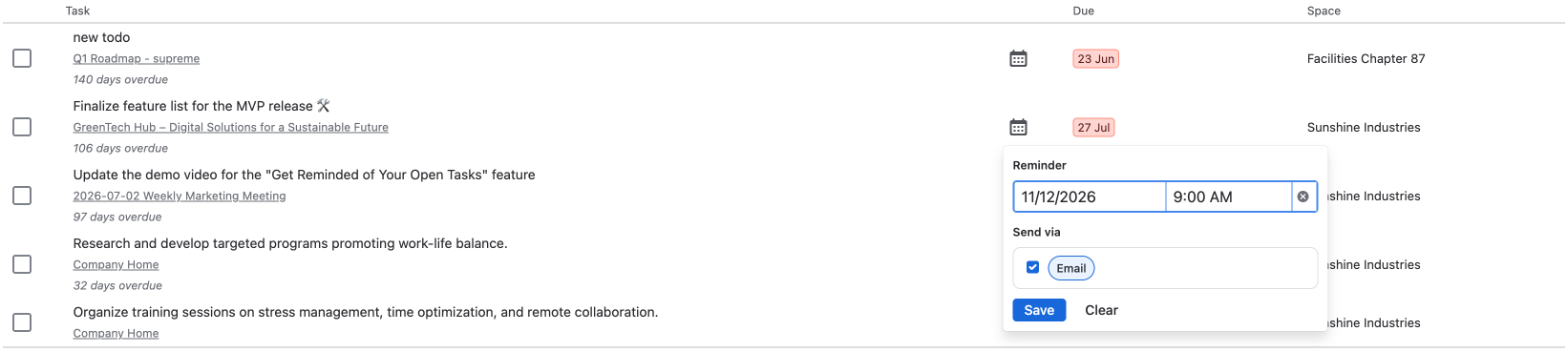
That's it! The calendar icon turns blue, and hovering over it shows when the reminder is due.
How do I change or remove a reminder?
Click the blue calendar icon again. Change the date, time or channel and click Save, or click Clear to remove the reminder.
Which channels can I use?
You can use every channel your administrator has set up and enabled for Task Reminder. Slack also needs a connected Slack workspace. If neither email nor Slack is available, Task Reminder tells you to ask a Confluence administrator to enable one in the Task Reminder settings.
When will the reminder arrive?
-
The time you pick is in your own time zone (the one your browser uses).
-
Task Reminder checks for due reminders every few minutes, so your reminder usually arrives within about 5 minutes after the chosen time.
-
If you have several reminders due at the same time, you get them together in one message per channel.
-
Each reminder is sent once.
What happens when I complete the task?
No reminder for work that's already done! If you complete the task on My Tasks, its reminder is removed right away. If you complete it somewhere else, for example on the Confluence page, Task Reminder notices it before sending and skips the reminder. Reminders for tasks that were completed, deleted or reassigned are also cleaned up once a day.
Good to know
-
You can set personal reminders only on your own open tasks.
-
You can have up to 200 personal reminders at a time, each up to one year ahead.
-
Personal reminders are independent of the scheduled reminders: you get them even if you unsubscribed from the scheduled reminders in your User Settings.
-
Personal reminders need an active Task Reminder license. Without one, they are kept but not sent until the license is active again.