
Welcome to the Task Reminder page! It is your personal home for Confluence tasks: every open task that is assigned to you in one list, personal reminders for the tasks that matter, and - for managers - an overview of the team's workload.
Where do I find it?
Open the Confluence sidebar, expand Apps and select Task Reminder. The page opens on the My Tasks tab.
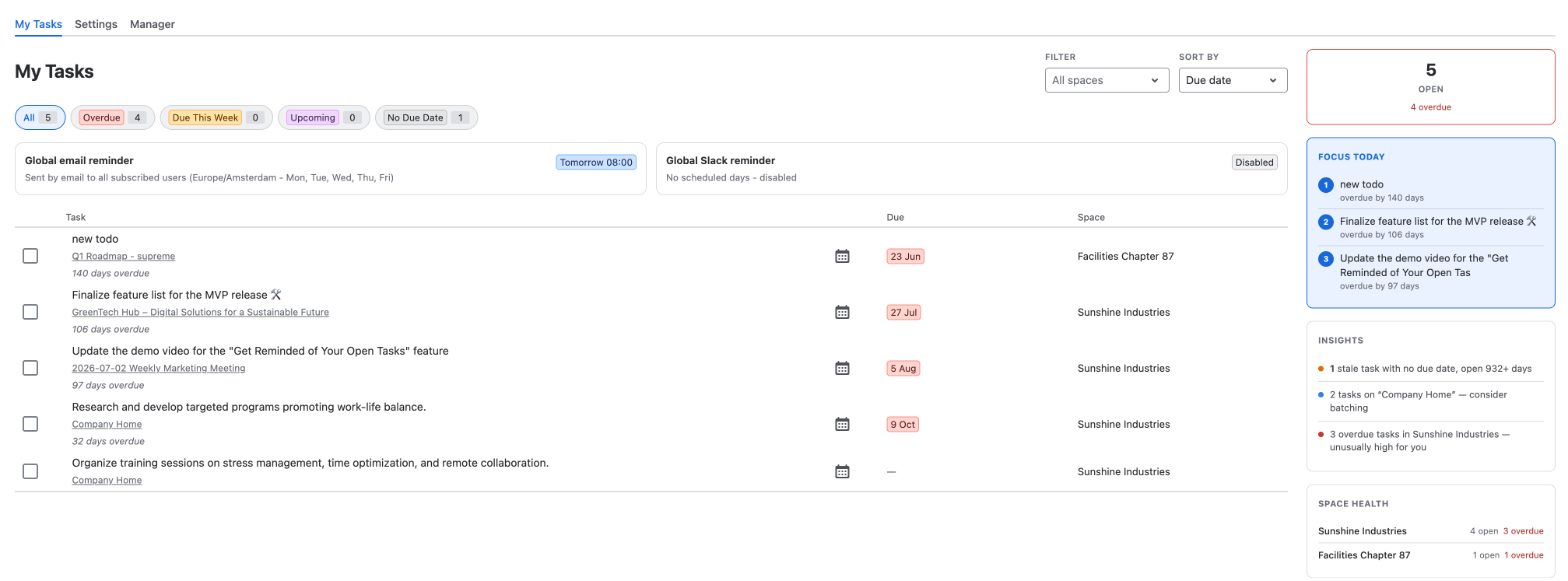
What's on the page?
The page has up to three tabs:
-
My Tasks - all open tasks assigned to you, with filters, sorting and a sidebar that shows how you are doing. Learn more on My Tasks.
-
Settings - your personal settings for the scheduled email and Slack reminders. Learn more on User Settings.
-
Manager - the open and overdue work of your team. This tab is only shown to Confluence administrators and to members of the manager groups. Learn more on Manager Overview.
Want a reminder for one specific task? You can set one right from the task list - see Personal Reminders.
Who can see what?
-
Everyone sees only their own tasks on My Tasks. Task Reminder reads them with your own Confluence permissions, so you never see tasks on pages you cannot open.
-
The Manager tab is available to Confluence administrators and to the groups an administrator selects under Managers. Managers also only see tasks on content they are allowed to view.
What if the page says "Task Reminder license inactive"?
Task Reminder needs an active license. If the license or the trial has expired, the page shows a notice instead of your tasks, and no reminders are sent. Please ask a Confluence administrator to check the Task Reminder license under Manage apps. As soon as the license is active again, everything is back - your tasks and settings are not lost.