
CSV export lets users download the rendered PocketQuery result table as a .csv file.
Before you start
The CSV action is available only when it is enabled in the PocketQuery macro settings.
-
Edit the PocketQuery macro you wish to enable the CSV export for.
-
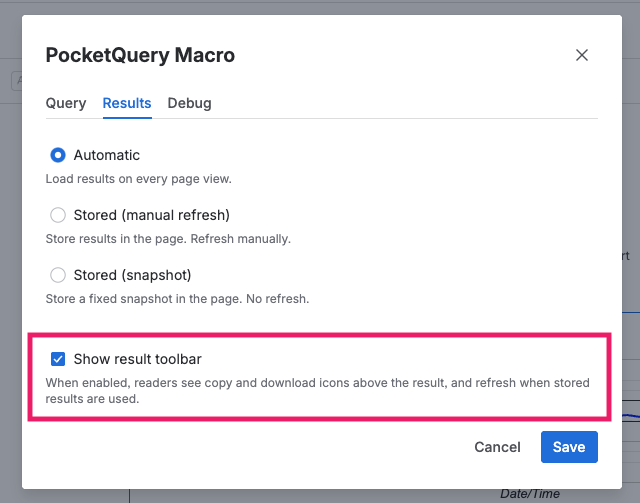
Open the Results settings.
-
Enable the option that shows the result toolbar:
-
Publish the page.
Download CSV from macro results
After the setting is enabled, a download action is shown in the query result area:
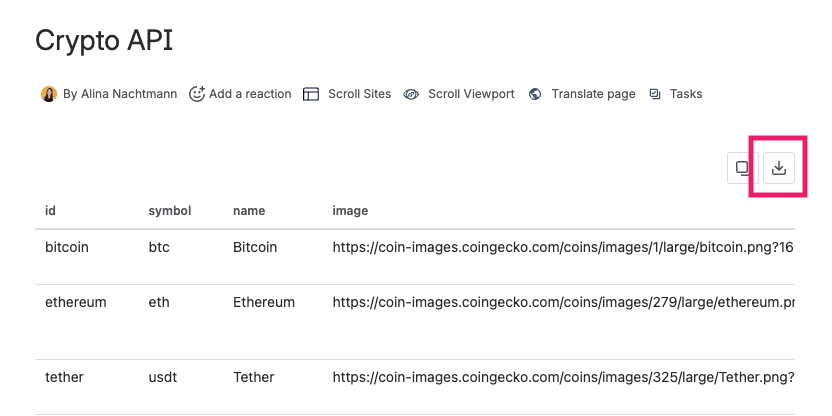
Query results can only be downloaded when they are displayed in table format.
What is included in the CSV file
-
The exported file is based on the table shown in the macro result.
-
Column headers and visible rows are included.
-
CSV escaping follows RFC 4180 rules (quotes, commas, and line breaks are escaped correctly).
-
UTF-8 BOM is included so spreadsheet tools like Excel open special characters correctly.
Notes
-
If the download action is not visible, check that result actions are enabled in macro settings.
-
CSV export is designed for table-shaped results. If your output is heavily custom-rendered, validate the exported file structure before sharing it.